Overview
dra-driver-cpu is a Kubernetes Dynamic Resource Allocation (DRA) driver that assigns exclusive CPUs
to workloads through ResourceClaims.
This driver provides an alternative to the CPUManager functionality implemented in the kubelet, offering additional benefits such as advanced topology selection through the rich DRA API and alignment with other DRA-managed resources (like GPUs and high-speed NICs).
Getting Started
The recommended way to install the driver is via the provided Helm chart:
helm install dra-driver-cpu oci://registry.k8s.io/dra-driver-cpu/charts/dra-driver-cpu -n kube-system
- Your cluster’s container runtime must support NRI and CDI — see Compatibility.
- The kubelet’s CPUManager and this DRA driver are mutually incompatible, and only one can be enabled at a time on any given node — see Configuration for how to disable the CPUManager.
The Quickstart walks through installing the driver and running a pod on exclusive CPUs, with a verification step after each stage. See the Helm chart README for the full list of configuration options, and Installation for compatibility, upgrade, and uninstall details.
Key Features
- Topology-Aware CPU Discovery: Discovers the node’s full CPU topology by reading sysfs, including sockets, NUMA nodes, cores, SMT siblings, Last-Level Cache (LLC), core types (Performance/Efficiency), and optionally PCIe root locality.
- Exclusive CPU Allocation: Pods requesting CPUs via a
ResourceClaimare pinned to exclusive, guaranteed CPUs enforced through CDI and NRI. - Shared Pool Management: All other containers are dynamically confined to a shared pool made up of CPUs not exclusively assigned to any guaranteed container.
- Grouped Device Exposure:
groupedmode exposes NUMA node, socket, or machine aggregates as consumable capacity. The driver also implements anindividualmode which is now deprecated; see Migrating from individual mode. - CPU Manager Feature Parity: Aims to match key kubelet CPUManager static policy options (e.g.
PreferAlignByUnCoreCache,StrictCPUReservation) - see Feature Support for the full comparison. - Stateful Restarts: Synchronizes with existing pods on restart by inspecting CDI-injected environment variables, rebuilding its allocation state without disrupting running workloads.
Use Cases
Topology-aware CPU allocation per workload
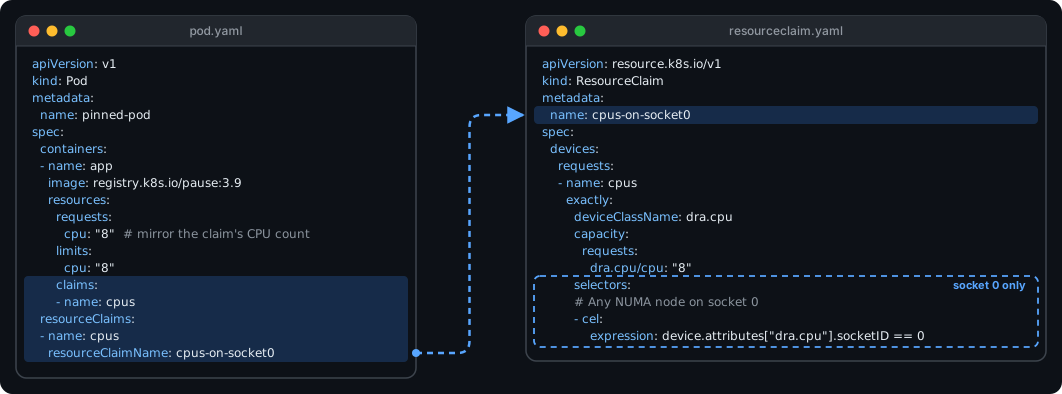
Each workload requests its own exclusive CPUs through a ResourceClaim. A CEL selector
constrains where the CPUs come from — for example, a specific NUMA node or socket — and the
selection can be made per workload.
Example: a claim to request CPUs on socket 0.
Allocation:
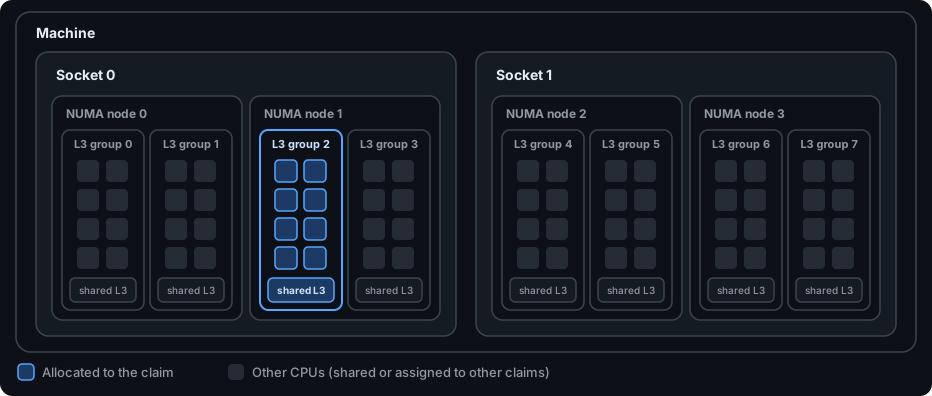
The CEL selector only picks socket 0; the driver keeps the allocation as tight as possible, within
a single NUMA node and packed into as few L3 caches as the free CPUs allow. To also pin to a specific NUMA
node, a second selector on resource.kubernetes.io/numaNode can be used alongside the socket one.
To keep scheduler accounting correct, either:
- enable the driver’s
publishNodeAllocatableResourceMappingoption (Kubernetes 1.37+ with theDRANodeAllocatableResourcesfeature gate), or - mirror the claim’s CPU count in the container’s
cpurequests and limits, as shown above.
See Workload Configuration Requirements for details.
CPU alignment with other DRA-managed resources
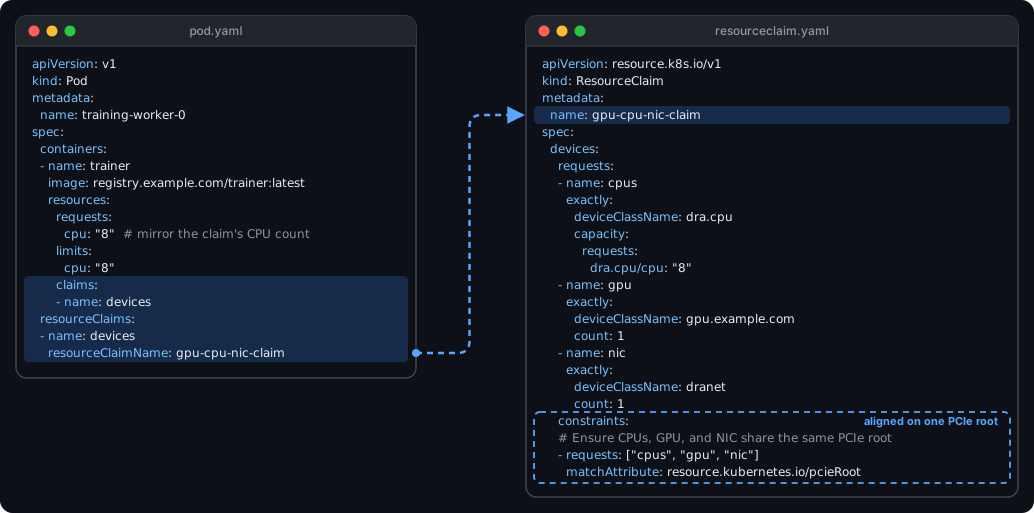
CPUs are allocated through the same DRA machinery as GPUs (e.g. the NVIDIA GPU DRA driver) and NICs (e.g. DraNet), so one claim can keep them on the same NUMA node or PCIe root. This helps avoid the extra latency and bandwidth contention of cross-socket traffic:
Example: one claim for CPUs, a GPU and a NIC that must share a PCIe root.
Allocation:
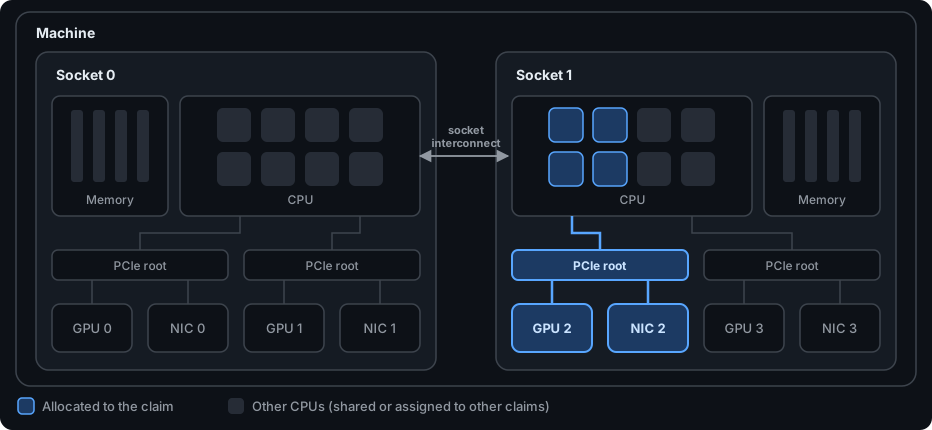
- PCIe root attributes are opt-in — see Exposing PCIe roots.
- For all selectable attributes and more example claims, see Device Attributes and Selectors.
- Coming from the kubelet CPU Manager? See the option-by-option mapping.
How It Works
The driver runs as a single executable, deployed as a DaemonSet on every node.
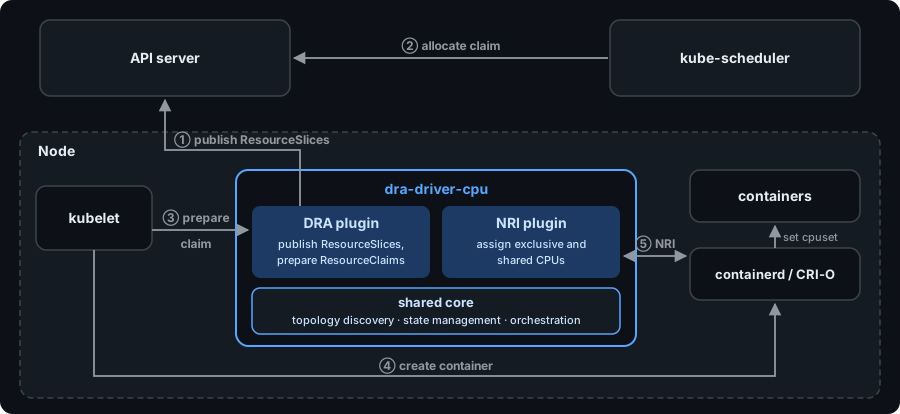
See How it Works for the detailed architecture.
Troubleshooting
If you run into problems, run the dracpu gatherinfo diagnostic tool and attach its output
when filing an issue — it collects the CPU topology and driver configuration needed to diagnose most problems quickly.
Documentation
User Documentation
- Quickstart - install, run a pod on exclusive CPUs, and verify each step.
- Installation - compatibility, runtime setup, security, uninstall, and migration from
install.yaml. - Upgrade - release-specific upgrade actions. Read this before upgrading the driver!
- Configuration - the config file schema, command-line flags, and kubelet prerequisites.
- How it Works - driver architecture, CDI, and NRI integration.
- Feature Support - supported/unsupported features.
- Matching Kubelet CPU Manager Options - kubelet cpumanager policy options and their driver equivalents.
- Workload Configuration Requirements - how to set pod/container CPU requests alongside DRA claims.
- Custom Opaque CPUSet Allocation Overrides - implement explicit core assignment when the external allocator integration is enabled; recommended upgrade path for users of
individualmode. - Metrics - Prometheus metrics exposed by the driver.
- Device Attributes and Selectors - selectable device attributes, CEL selector examples, and sample
ResourceSliceoutput in each mode. - Troubleshooting & Diagnostics - the
dracpu gatherinfodiagnostic tool.
Developer Documentation
- Testing - running unit/E2E tests and testing local changes in a Kind cluster.
- Linting - running and auto-fixing lint issues.
- Logging Guidelines
- Configuration Guidelines - about adding more tunables to the driver
- Deep dive: PCI/PCIe root buses on Linux
- Deep dive: Linux topology reporting
Community, discussion, contribution, and support
Learn how to engage with the Kubernetes community on the community page. Participation in the Kubernetes community is governed by the Kubernetes Code of Conduct.
You can reach the maintainers of this project at:
- Slack - preferred channels: #sig-node #wg-device-management
- Mailing List